|
| |
| |
 |
|
| |
 |
|
| |
watch step-by-step video tutorial |
|
|
| |
 |
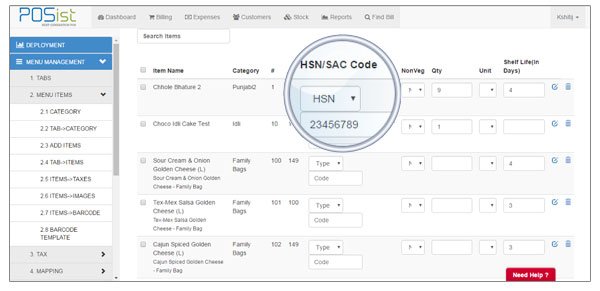
| Functionality to assign HSN/SAC code to items |
 |
| The user needs to assign the codes to all the items first. In Administration -> Menu Management -> Menu Items -> Add Items, a new column in the name “HSN/SAC code” has been added. The user can select the type i.e. whether the item falls under HSN or SAC and can enter the code then against each item. The same also reflects in the bill at the time of billing. Also, CSV import has been updated to handle HSN/SAC code. |
|
| |
 |
|
| |
 |
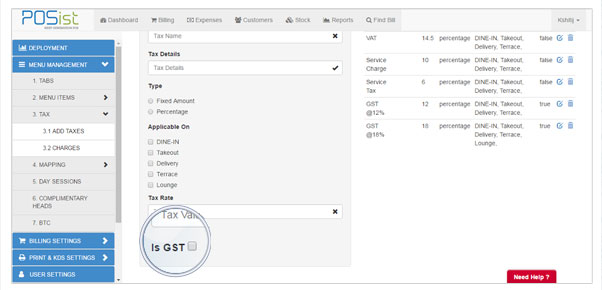
| Is GST Flag In Taxes in normal deployment and Enterprise |
|
| After assigning the codes to all items, the user needs to create GST taxes. In Administration -> Menu Management -> Tax, a new check-box “Is GST”, has been added i.e., the user can now create GST taxes by checking on “Is GST” checkbox and it will get created successfully. |
|
| |
 |
|
| |
 |
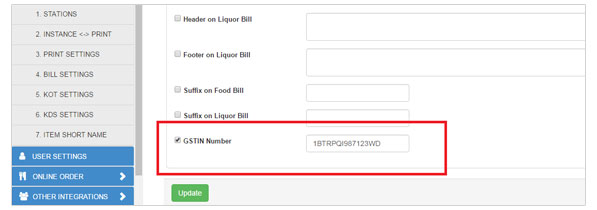
| GSTIN Number in Bill by using deployment setting |
|
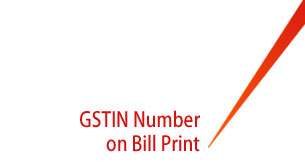
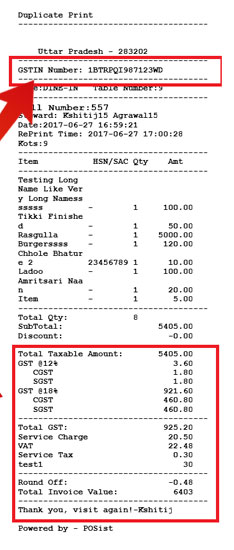
| Set the GSTIN No from the settings. In Administration -> Print and KDS Settings -> Bill Settings, , the user can add a unique GSTIN number in bill which is printed on the top of the bill. |
|
| |
 |
|
| |
 |
| Bill Print template specific for GST |
|
| |
| |
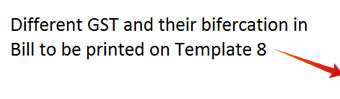
After setting the GSTIN No, select the bill print template.A new template i.e. Template No 8 has been specifically designed for GST. In Administration -> Billing Settings -> General, the user can enter the template no against the field “Bill Print Template No” as 8. It will pick up the GST template and the bill print will be generated accordingly. |
|
| |
 |
| |
 |
|
 |
|
|
| |
 |
| GSTIN Number in CRM |
|
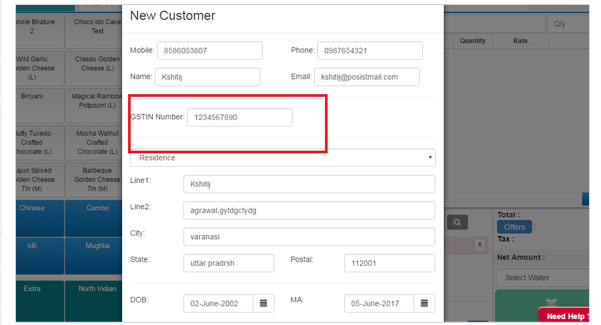
| The unique GSTIN number field can be added at the time of filling the information of the customer at the time of billing. |
|
| |
 |
|
| |
| |
Learn GST to have a better control over your restaurant business. |
| |
A Course on GST for Restaurants |
|
|
 |
|
|
|